Whether you're holding a contest for a sponsored giveaway or showcasing UGC photos and videos, your audience engages with your Megaphone content on MegaPages—interactive landing pages for your campaigns, sponsorships, and events.
Each MegaPage has a public link for your audience to visit directly. You can share the direct link using the Share Link or Share QR buttons in Megaphone Studio.
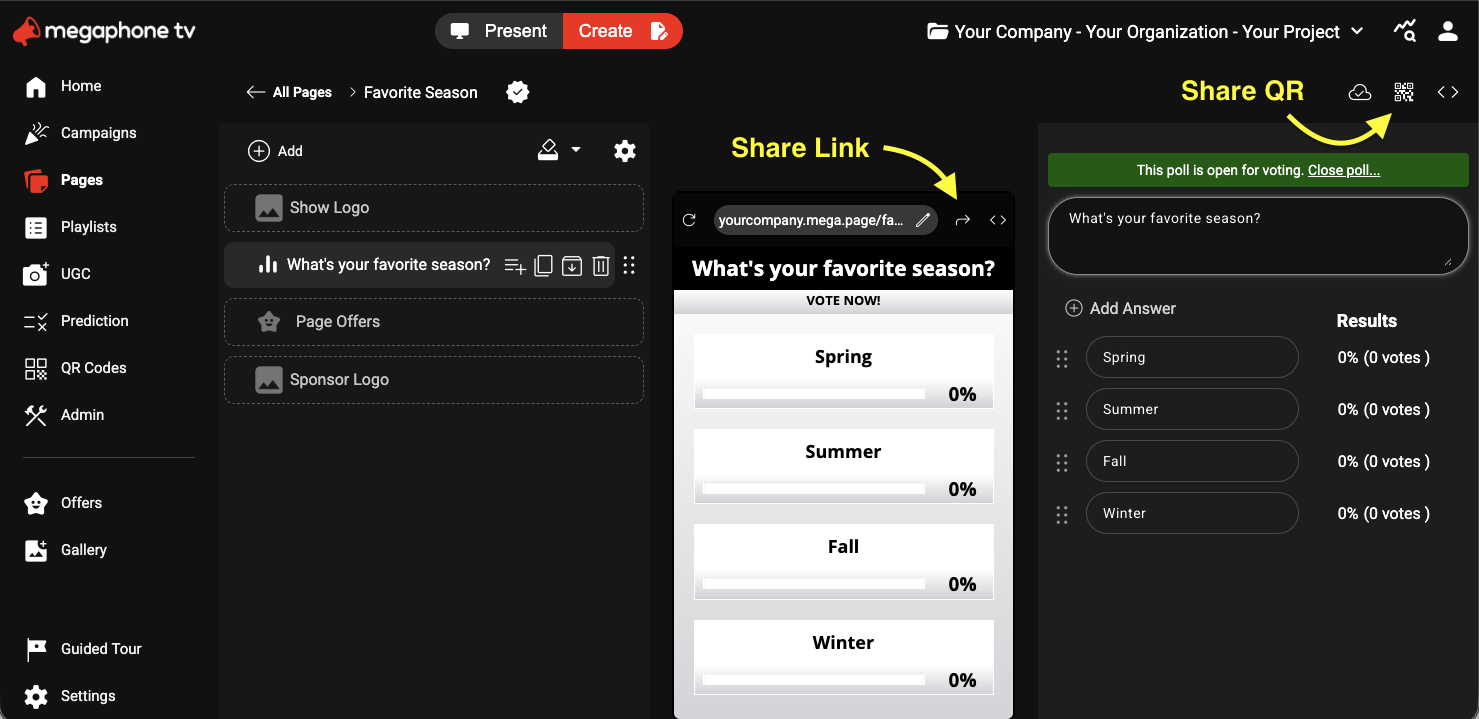
In addition to sharing direct MegaPage links, you can also add Megaphone to your own website using Studio's Embed button, which works just like embedding a YouTube video.
To add a specific MegaPage to your site, follow the steps for Embedding a MegaPage on Your Website.
To add your project's Home page to your site, follow the steps for Embedding Home on Your Website. Home is your project's main public landing page, which provides a single destination for your audience. Home updates automatically when you choose What's on Home in Megaphone Studio's dashboard.
To add your project's Featured Page to your site, follow the steps for Embedding the Featured Page on Your Website. The Featured Page lets you switch between multiple MegaPages on your website without having to update your CMS or website's code.
If you have any questions about adding Megaphone to your website, please contact support@megaphonetv.com.
Was this article helpful?
That’s Great!
Thank you for your feedback
Sorry! We couldn't be helpful
Thank you for your feedback
Feedback sent
We appreciate your effort and will try to fix the article